
Black Friday inventory planning usually starts from one number, and it's the wrong one. "30 days of stock left" sounds safe on 4 November. It isn't, if those 30 days were worked out at the rate you sold in October. Adobe expects clothing basics to sell about three times their September rate online in Cyber Week, and household cleaning about one and a half times. The same stock lasts a third as long. This is the check we'd run this week: work out which products will run out first at peak speed, work back from your supplier's lead time to an order-by date, and decide now what to do about the ones it's already too late for.
The number you're probably looking at
If you sell on Shopify, you may already have a figure for this. The Products page has an inventory analytics bar, and one of its tiles is days of inventory remaining. Shopify's product analytics help page defines it as the quantity still in stock at the end of a period, divided by the average quantity sold per day during that period.
It's a good number, and you should use it. But read the definition again: it's built on the rate you sold at during the period. In early November, that period is a recent window, the last few weeks. Those were normal weeks. Black Friday week isn't.
Adobe's 2026 holiday forecast, published on 28 September and built on Adobe Analytics data across more than a trillion visits to US retail sites, puts Cyber Week (Thanksgiving to Cyber Monday, 26 to 30 November this year) at $47.5 billion online, 17.3% of the whole season's spend in five days. And it gives the jump for everyday categories, compared with their average September sales. (Adobe's baseline is September; your tile's is the last few weeks. Both are normal weeks, which is the point.)
Figure 1 · Adobe 2026 holiday forecast
Clothing basics sell three times their September rate in Cyber Week
US online sales in Cyber Week against the average September 2026 level, by category.
Cyber Week vs the September average
- Clothing basics3.1×
- Personal hygiene2.5×
- Baby products2.1×
- Pet products1.9×
- Household cleaning1.5×
Those are national figures for whole categories, not a forecast for your shop. They're also online sales in dollars, not units: with Cyber Week discounts, each dollar buys more items, so the jump in units is likely larger, and these figures are the conservative reading. Your own bestseller may jump more, or less. But they tell you the size of the mistake you make if you plan Black Friday at October's speed: between one and a half and three times too slow.
What that does to "30 days left"
Take a product with 30 days of stock at its normal rate. Now let it sell at Cyber Week speed for its category.
Figure 2 · Illustrative
“30 days left” lasts under 10 for basics
Days of stock at the September rate, and the same stock at Cyber Week speed.
Clothing basics
9.730Personal hygiene
12.030Baby products
14.130Pet products
15.530Household cleaning
20.130
┆ 10 days
Thirty days of basics becomes under ten. Follow one through the calendar. On 4 November it has 30 days of stock at its normal rate, which looks like it lasts to 4 December. Selling normally until Thanksgiving on 26 November uses 22 of those days. The 8 that are left, at three times the speed, last about two and a half days. It sells out on the Saturday after Black Friday, before Cyber Monday, which Adobe expects to be the biggest day of the season, at $15.1 billion.
It's worse than that for the products that matter most, for three reasons.
The peak isn't evenly spread. A multiplier for "Cyber Week" is an average over five days. Some of those days are far bigger than others. Adobe expects Black Friday at $12.9 billion and Cyber Monday at $15.1 billion, against $6.9 billion for Thanksgiving.
Stockouts happen in sizes, not in products. A jacket with 40 units can be sold out in medium while it still has 15 in XS. Most stock views and alerts look at the product. Your shopper looks at the size they wear.
Your discount is part of the multiplier. The categories in Adobe's list jump partly because they're discounted. If you're running a sale on a product, its rate in Black Friday week will be higher than it would have been without one. That's the point of the sale, and it's the part people forget to plan stock for.
The Black Friday inventory planning check, in six columns
You can do this in a spreadsheet in an afternoon. You don't need special software, and doing it by hand once is the best way to see whether any tool is doing it right.
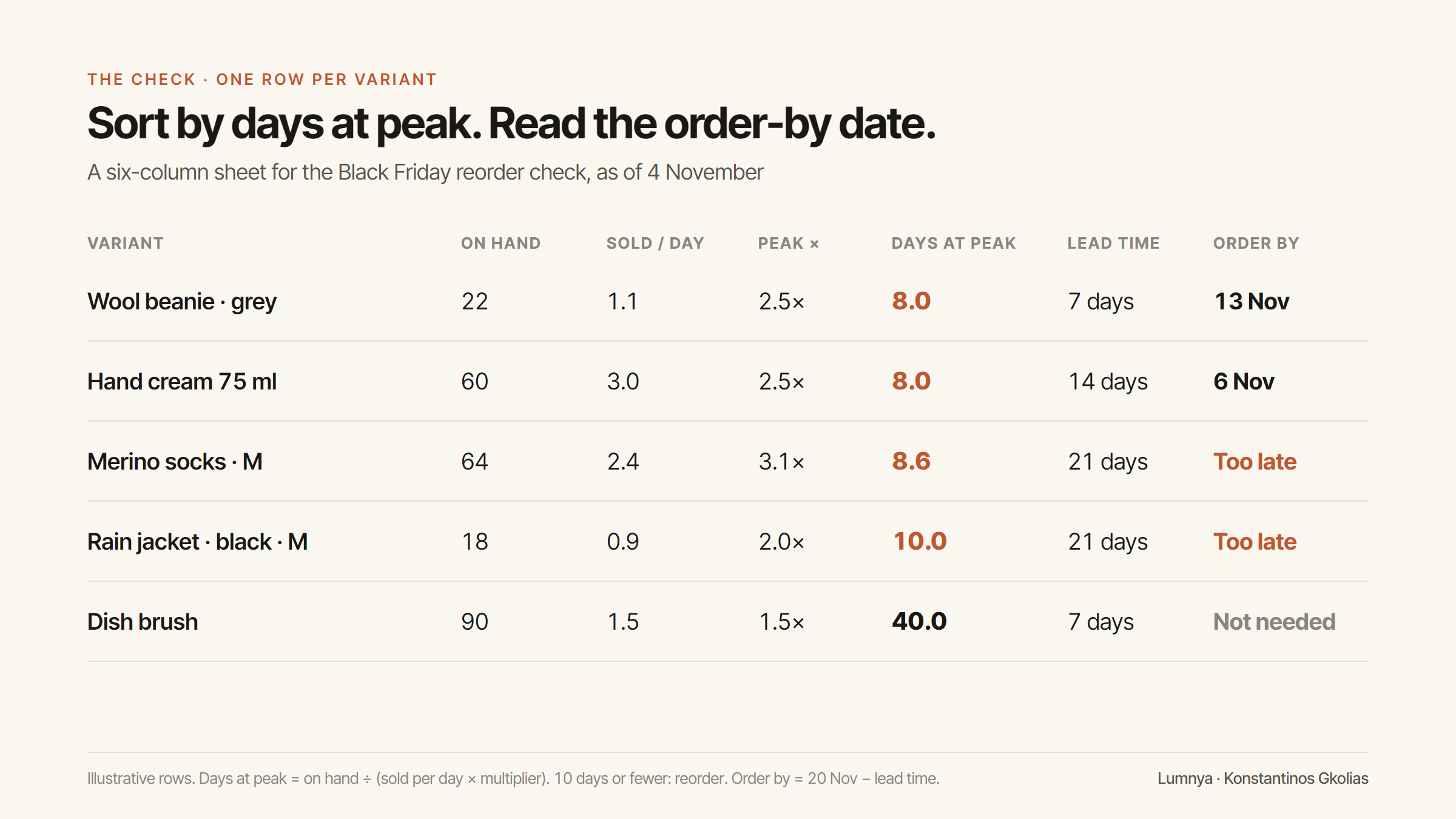
1. On hand, per variant. Export your inventory with quantities per variant (Products → Export, or the inventory page). Variant, not product. If you track stock in more than one location, use the locations that actually ship online orders.
2. Sold per day, per variant. Take the last 28 days of orders and divide units sold by 28. Use four whole weeks, so each weekday counts the same. If a variant was out of stock for part of that time, divide by the days it was actually on sale, or you'll understate how fast it sells.
3. The peak multiplier. The best one is your own: last year's Black Friday week against last year's October, per product if you have the history, per collection if you don't. If you have no history, Adobe's category figures are a starting point. If you'll be discounting the product, push it up, not down.
4. Days of stock at peak. On hand ÷ (sold per day × multiplier). This is the column to sort by. Anything at 10 days or fewer is a product that can run out during Cyber Week if you do nothing.
5. Lead time. How many days from placing an order to having the stock on the shelf and live in your store. Not the supplier's dispatch time: the whole thing, including delivery, counting it in and updating the store. Ask your supplier this week what their lead time is in November. It's usually longer than the rest of the year.
6. Order by. The date the stock needs to arrive, minus the lead time. For a Black Friday sale, we'd want the stock in by 20 November, a week before, so there's time to receive it, count it and fix whatever arrives wrong.
Getting your own multiplier
Adobe's figures are a fallback. Your own history is better, and if you sold through last November, you already have it. Here's how we'd get it in twenty minutes.
Pick the two windows. Last year's peak: Thanksgiving to Cyber Monday 2025, which was 27 November to 1 December. And a normal window before it: the four weeks of October 2025. Use the same lengths in days when you compare, or divide each by its own number of days.
Pull units sold per variant for both. A sales report by product variant in Shopify Analytics, filtered to each date range, or an orders export you total in a sheet. Units, not revenue: last year's prices aren't this year's, and a discount inflates units and shrinks revenue at the same time.
Divide. Units per day in the peak window ÷ units per day in October. That's the product's own multiplier. Do it for your top 30 products, or for each collection if the products are too new to have a history.
Three things to watch while you do it.
- A product that sold out last year shows a false, low multiplier. If it ran out on the Saturday, the peak window only counts two days of selling. Divide by the days it was actually in stock.
- Last year's sale isn't this year's. A product that was 30% off last Black Friday and is full price this year won't jump as much. Adjust by hand; nobody knows your promotions better than you.
- Small numbers lie. A product that sold 3 in the whole of October and 2 in last year's Cyber Week has a multiplier of about 4 ((2 ÷ 5 days) ÷ (3 ÷ 31 days)), and most of that is luck. For anything selling under one a day, use the collection's figure.
When you're done, keep the sheet. Next year it's the first column, already filled in.
The order-by date is the part that hurts
Here's what column 6 looks like on 4 November, for stock you want in by 20 November:
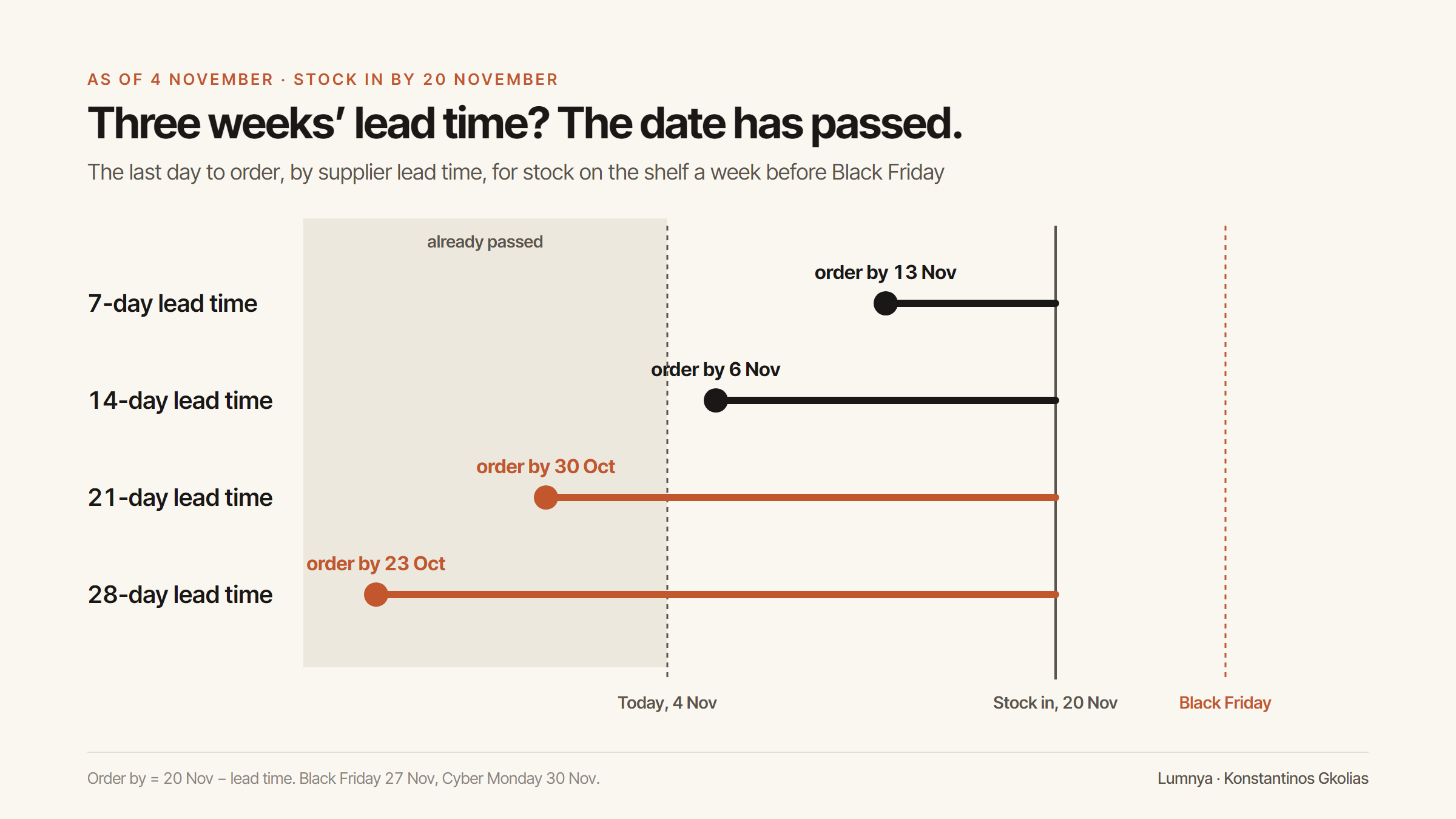
If your supplier needs three weeks or more, the order-by date for Black Friday has already passed. That isn't a reason to give up. It's a reason to decide, today, what you'll do instead. There are four honest options.
- Order anyway, for the week after. If the product sells well in December too, stock arriving on the 27th isn't wasted. It just doesn't save Black Friday.
- Move the sale off it. Don't put a discount on a product you can't restock in time. A sale speeds up the stockout and sends the shoppers who arrive after it to a sold-out page.
- Sell it on pre-order, with a real date. Shopify lets you keep selling a product at zero, and a pre-order with an honest shipping date keeps the sale. The date has to be true. If you change it later, you'll be emailing everyone who bought.
- Point shoppers to what you do have. If the medium will sell out, make sure the product page and your support answers know which similar product is in stock.
The fifth option, ordering double of everything "just in case", is how last week's problem starts. Stock bought for a peak that doesn't come is next spring's dead stock.
How much to order
Once you know what to reorder and by when, the quantity is the same arithmetic, the other way round:
Units to order = sold per day × multiplier × days you want to cover − on hand − already on order.
"Days you want to cover" is a judgement. For a product that sells all year, cover Cyber Week plus your lead time, so you aren't empty in the week the next order would arrive. For a gift item that stops selling on 20 December, cover to then and no further.
Two warnings with that formula.
Use your multiplier, not the most hopeful one. If you put 3.1 into every row because clothing basics did, you'll buy too much cleaning spray.
Round down on things that don't keep. Anything seasonal, dated or perishable goes from bestseller to clearance in January. If the formula says 140 and the supplier sells in boxes of 50, buy 100 and watch, before you buy 150 and hope.
Five questions for any inventory tool
There are many apps that promise to forecast your stock, and some do it well. Before you trust one with Black Friday, it's worth asking it the questions this sheet answers.
- Does it use how fast each item sells, or only how many are left? A threshold of "20 left" is an alert, not a forecast. A forecast needs a rate.
- Does it work per variant? If it says a product is fine while the medium is nearly gone, it's looking at the wrong level.
- Does it know when an item was out of stock? Days with zero stock and zero sales aren't days when nobody wanted it. A tool that counts them as normal days thinks your bestsellers are slow.
- Can you tell it about the peak? Either it learns from your own last November, or it lets you enter a multiplier. If neither, its Black Friday answer is an October answer.
- Does it give you a date, not just a quantity? "Order 40" is half an answer. "Order 40 by 6 November" is one you can act on, because it uses your lead time.
A tool that answers yes to all five is doing the six columns for you. A tool that answers no to the first one is a stock alert with a forecasting name.
Where Lumnya stands on this
We build ecommerce agents, and one of them is Inventory Forecaster. It looks at both numbers this article is about: how many units are left, and how fast each product sells. A product with 20 left that sells one a week and a product with 20 left that sells ten a day are not the same problem, and it doesn't treat them as the same.
It runs once a day. For a product that needs reordering it writes a recommendation: the current count, a link to the product in your Shopify admin and a suggested quantity. Nothing is ordered for you. The recommendation is a card you can act on or ignore.
Two things it can't know on its own: your supplier's November lead time, and what you're planning to discount. Those are yours. That's why the six columns above are still worth doing once by hand, with or without us: they're how you check any tool's answer, ours included.
Two things in Lumnya do help with peak stock today. When a product is really at zero and a shopper asks to be told when it's back, a restock alert is set for them, and they're emailed when the stock returns. The number of people waiting on a product is the most direct reorder signal you'll get. We wrote about that, and about Demand Radar, which counts what shoppers ask for that you don't sell, in *What your shoppers ask for that you don't sell*. And when a product does have only a few left, the assistant can say so, because that claim is checked against the inventory record. When it isn't low, the assistant can't say it is.
The afternoon checklist
Run this before the end of the week.
- Export on hand and the last 28 days of sales, per variant. Not per product.
- Pick a multiplier for each row. Your own Black Friday history first. Adobe's categories if you have none. Higher for anything you'll discount.
- Sort by days of stock at peak. 10 days or fewer: on the list.
- Ask each supplier for their November lead time. Write down the real number, door to store.
- Work out each order-by date for stock in by 20 November. Anything in the past goes to the four options: order for after, take it out of the sale, sell it on pre-order with a true date, or point shoppers to what you have.
- Order the rest this week, using your multiplier, not the biggest one.
- Write down what you expected. On 1 December, compare it with what you sold. Next year's multiplier is the most useful number you'll get out of this Black Friday.
The bestseller that runs out on Black Friday afternoon is rarely a surprise. Its numbers were in the store in October. They just weren't multiplied.
Frequently asked questions
How do I plan inventory for Black Friday?
Work out each variant's days of stock at peak speed: units on hand divided by units sold per day, times a peak multiplier. Then subtract your supplier's real lead time from the date you need the stock in, and order everything that runs out within ten days of peak before that date.
How much faster do products sell during Cyber Week?
It depends on the shop and the category. Adobe's 2026 forecast expects online sales of clothing basics at about 3.1 times their September level in Cyber Week, and household cleaning at about 1.5 times. Your own last November is a better guide than any national figure.
What if the reorder date has already passed?
Decide now instead of hoping. Order anyway for the weeks after, take the product out of the sale, sell it on pre-order with a true shipping date, or point shoppers to a similar product you have in stock.
Sources
- [1] Shopify Help Center, “Product analytics overview” (days of inventory remaining; product sell-through rate) (accessed 2026-10-31)
- [2] Adobe, “U.S. Holiday Shopping Season to Hit Record $275.1 Billion Online, Rising 6.7% YoY”, 28 September 2026 (accessed 2026-10-31)
- [3] Lumnya, “Clear dead stock before Black Friday without teaching shoppers to wait”.
- [4] Lumnya, “What your shoppers ask for that you don't sell”.
- [5] Lumnya product behaviour described here: Inventory Forecaster as of 4 November 2026; the chat's scarcity gate as checked against Lumnya's code on 31 October 2026. Restock alerts and Demand Radar as verified for the 25 October piece (24 October 2026).
Lumnya is a team of ecommerce AI agents for Shopify stores, now in private beta. Join the waitlist.
Comments
…Every comment is read and approved by a human before it appears — the same confirm-gated rule the product runs on.
Loading comments…
Filed under Operators' Playbook
All posts