
When you let an AI tool refund an order, send a customer an email or change a price, someone will tell you it's safe because it has AI agent guardrails. Ask one question about each of them: does it run before the action, and can it say no? A notification after a refund tells you the money has gone. A log tells you what went wrong. Neither stops anything. We measured how the people who know these tools best, developers wiring AI agents into their own machines, set up their own checks. Most of what they built can't refuse anything. This is our view of what a merchant should ask for instead.
What the most careful users build
Developers who use AI coding agents every day have a way to put their own checks around them. Claude Code lets you attach small programs, called hooks, to moments in the agent's work, and other agents have similar mechanisms: before it runs a command, after it edits a file, when it finishes, when a session starts. A hook that runs before an action can inspect it and block it. A hook that runs after can only react.
Last week, for a separate piece of research, we read the public setup files of a random sample of 6,000 GitHub repositories where developers keep their machine configuration ("dotfiles"). 800 of those that were active in 2026 set up an AI coding agent. The code and data are public. For this piece we went one step further and looked at which moments their hooks are attached to, and whether the code behind them can refuse anything.
Here is what 800 developers who set up these agents on their own machines wrote down.
Figure 1 · 800 developers' AI agent setups
Most hook setups run before the agent acts. One in seven can stop it.
Public dotfiles setups with an AI coding agent, active in 2026, narrowed step by step.
Agent setups
- Set up an AI coding agent800
- Attach hooks to it242
- Have a hook before a tool runs162
- Wire code there that can say no35
- 242 of the 800 (30%) set up hooks at all. (This count looks for hook event names in settings, hook folders and plugin files. It differs a little from the 231 in our earlier count, which looked for a
hooks/folder, ahooks.jsonor a"hooks"key; the two methods catch slightly different setups.) The other 558 rely on the agent's own permission settings, or on nothing. - 162 of those 242 have a hook that runs before the agent uses a tool. That's the right place for a check.
- But only 35 of the 162 wire code there that can actually say no: a script, run before the tool, that exits with the "block" code or returns a "deny" decision. That's about one in seven of the setups with hooks. We read four of the 35 by hand, and all four really refuse. Some scripts live outside the folders we searched, so the true figure may be a little higher.
- 64 of the 242 have hooks, but none on tool use at all. They run when a session starts, run a command when the agent finishes, or send a notification.
We also read a few by hand to see what the "before" hooks that can't refuse actually do. One makes a backup copy of every file before the agent edits it. Another opens a preview of the change in the editor. Both are useful. Neither stops the agent. The ones that do refuse look different: one script denies any command that would install packages the wrong way, with a reason the agent reads back.
Figure 2 · When the hooks run
One in four hook setups never touches a tool
Of the 242 setups with hooks: how many have at least one hook at each moment. One setup can use several.
Setups with a hook at each moment
- Before a tool runs162
- When the agent stops120
- At session start119
- After a tool runs101
- On a notification81
- When a prompt is sent71
None of this is a criticism of developers. A backup before an edit is a sensible thing to want, and a developer is protecting their own laptop, with their own hands on the keyboard. The point is the shape. Even among people who build software for a living, most of the machinery wrapped around an AI agent observes it rather than stops it.
Why the shape matters more in a shop
A developer's agent edits files they can undo. A store's agent touches things that can't be undone the same way.
A refund is money leaving your account. An email to a customer is read the moment it arrives. A discount code, once posted in a chat, gets shared. A cancelled order can't be quietly un-cancelled after the customer has been told. For every one of these, there's only one moment when a check is worth anything, and it's before.
Yet the safety features AI tools describe most proudly are often the ones that come after: you get a notification for every action, there's a full audit log, you can review everything in a dashboard, there's an undo button. All of those are worth having. None of them is a guardrail. They're how you find out about a problem. A guardrail is how you don't have one.
A useful way to sort any feature on a vendor's safety page is to ask where it sits on a timeline:
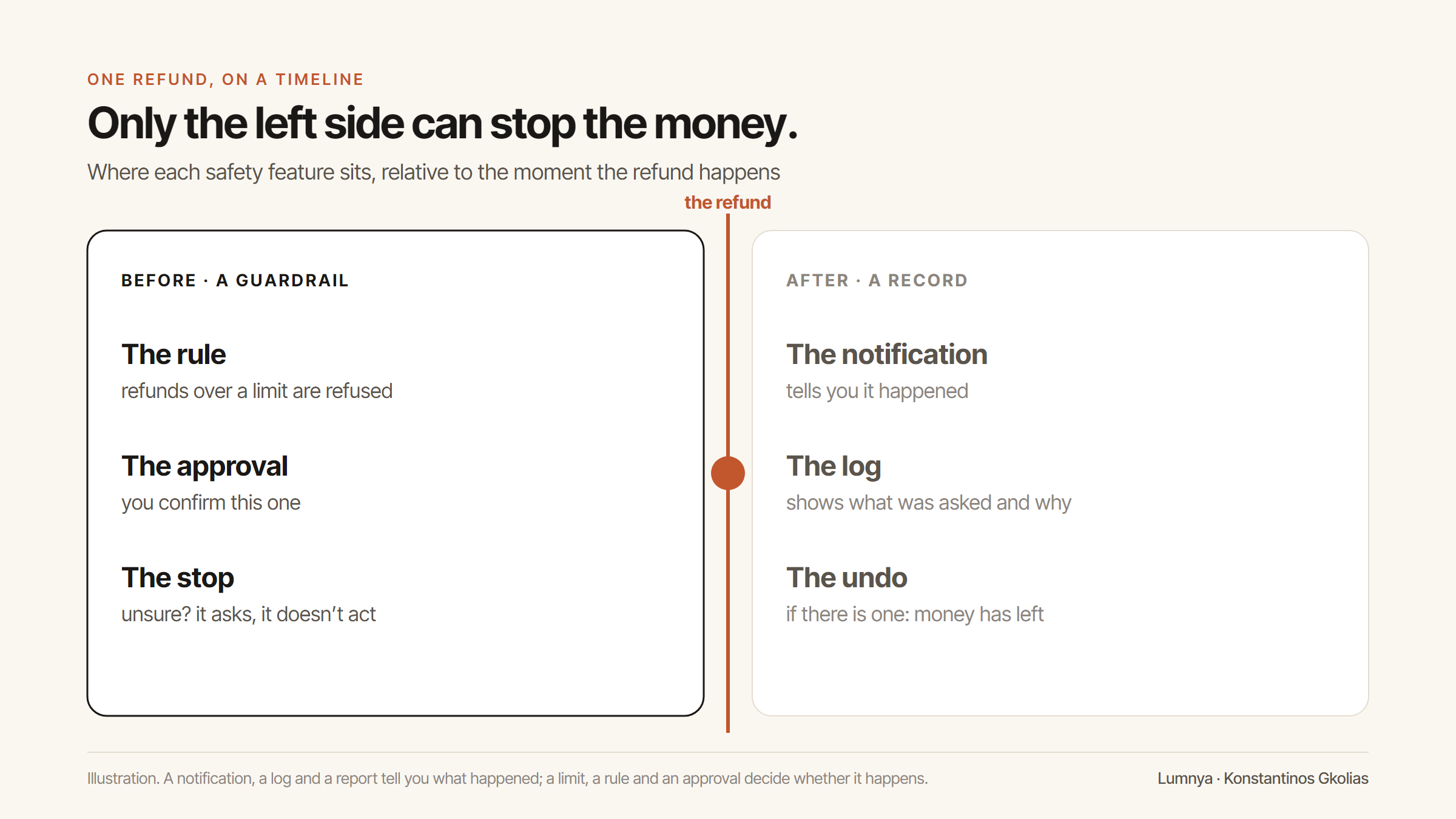
Three questions to ask about AI agent guardrails
When a tool asks to take an action in your store, here's what we'd want to know about each check it claims to have.
1. Does it run before the action? Not "is it checked", but when. A daily report that flags a bad refund is a report. A rule that refuses the refund is a check.
2. Can it say no, and who wrote the "no"? A check that runs before the action but can only warn is like the backup hooks above: useful, not a gate. And a "no" written in the AI's instructions ("never refund more than €100") is a request to the model, not a rule. We wrote about the difference in *A prompt is not a contract*: the only "no" that holds is one in code that runs whatever the model says.
3. What happens when the check itself breaks? Every check fails sometimes: a timeout, a missing setting, a value it doesn't recognise. A check that fails open lets the action through when it can't decide. A check that fails closed stops it and asks. For anything involving money, you want the second, and you want the vendor to tell you which one they built.
If a vendor answers all three well, you can let their tool do more over time. If they answer the first with a list of notifications, you know what you're buying.
How we built Lumnya around the "before"
This is how Lumnya decides whether an action can happen, as it's written in our code today. We describe it so you can hold us to it, not because it's finished.
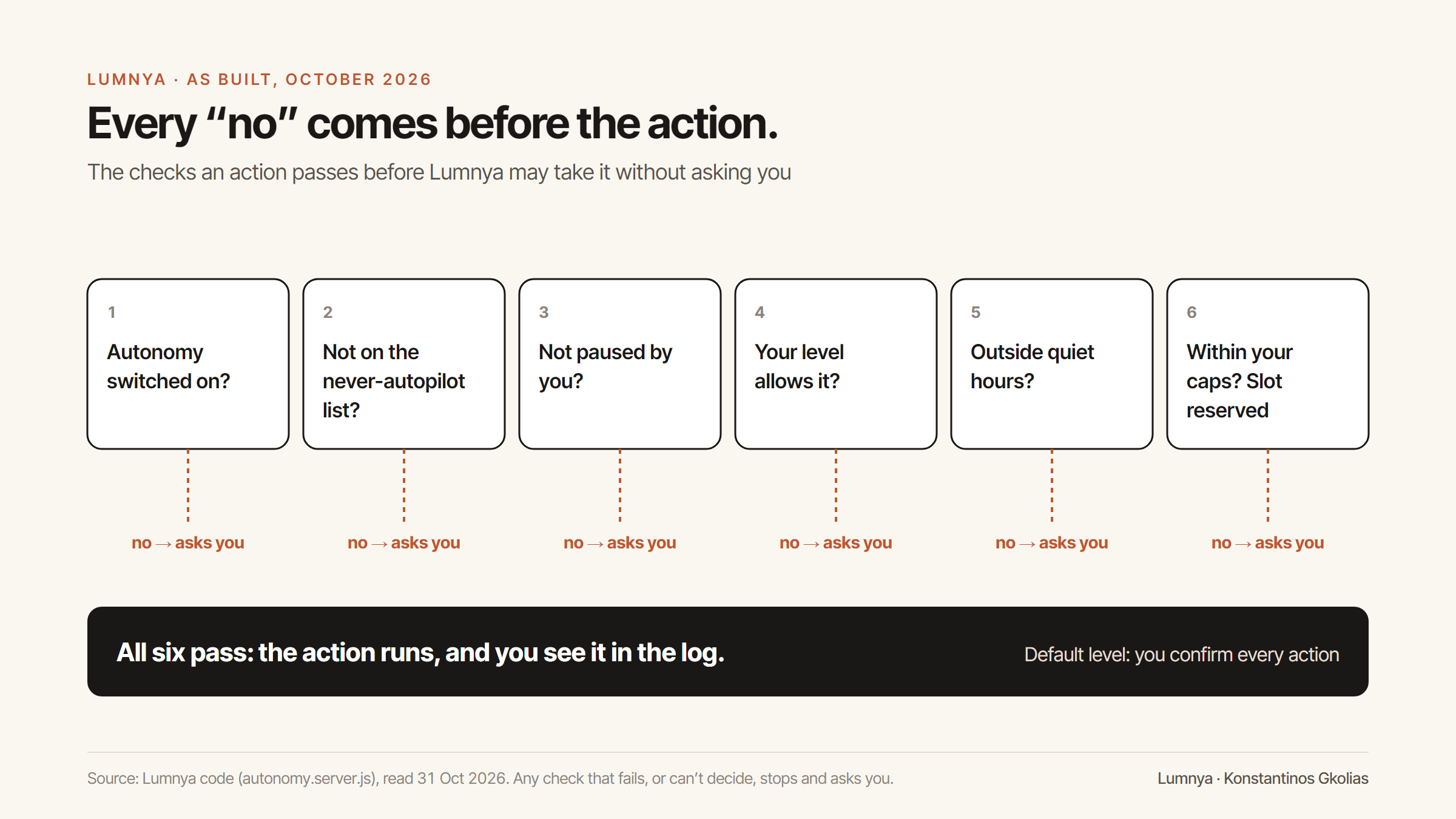
The default is to ask. Every action Lumnya can take in your store either sits in a category (discounts, returns, emails and so on) with an autonomy level you set, or always asks. The default, and what happens when no setting exists at all, is level 1: Lumnya proposes, you confirm, then it acts. There's also a level below it, where Lumnya only suggests and you do it yourself in Shopify. (We wrote separately about how far an AI's own autonomy should go.)
Some actions never run alone, whatever you set. Refunding an order, deciding on a return, sending a customer an email the AI wrote, sending a message in a live chat, creating a support ticket, and changing the settings that control money: these are on a list we call "never autopilot". Even if you turn a category up to the highest level, these still stop and wait for you. We think that's the line that makes it safe to offer any autonomy at all.
When you do choose autopilot, the limits are checked before, and the slot is taken before. Autopilot also sits behind a server switch of ours: when that switch is off, every action asks you, whatever the level. For categories where you allow Lumnya to act alone, you set caps: a maximum discount, a maximum per action, per month, a number of actions per day, and quiet hours. The server checks each one before the tool runs. For the daily and monthly limits, it reserves the slot first and only then lets the action happen, so two actions at the same moment can't both squeeze under the same limit. If the action fails, the slot is released.
When the check can't decide, it stops. If something goes wrong while working out whether an action is allowed, the answer is "ask the merchant". A classification the server can't compute is treated as never-autopilot. That's what failing closed looks like in practice.
The "no" is in the server, not in the model. None of these checks is an instruction to the AI. The model can ask for anything; the server decides. In our code's own words, the model "can never talk its way past a cap". It's the same idea behind the rule for what our assistant may claim about stock and deadlines.
There's one place where something happens in Lumnya without a question each time, and you should know about it. In returns, a request on an order worth 50 or less in your store's currency is approved by a rule, by default. It's a rule the server checks before the approval, not the AI's judgement, and you can change the amount or switch it off. Changing it is itself on the never-autopilot list, and the change is shown to you beside the old value before you confirm. The approval sends the customer the return instructions, a notice sent by a rule, like a restock alert, not a message the AI composed. It issues no refund, and refunds are on the never-autopilot list. But it's a default that says yes on your behalf, and we'd rather you hear it from us.
Six store actions, sorted by what an undo can do
Not every action needs the same gate. The useful test is what happens if it goes wrong and you only find out afterwards. Here's how we'd sort six common ones.
| Action | If it goes wrong, can you put it back? | What should run before it |
|---|---|---|
| Change a product's price | Yes, if you notice before anyone buys | A limit on how far it can move, and a floor at cost |
| Create a discount code | Partly: you can disable it, not un-share it | A maximum percentage, an end date, and a usage limit |
| Adjust stock levels | Yes, but orders placed on the wrong number stay placed | A sanity check against the last count |
| Cancel an order | No: the customer has been told | A confirmation from whoever owns the decision: you, or the customer for their own order, under your rule |
| Send a customer a message the AI wrote | No: it has been read | Your confirmation, every time |
| Refund an order | No: the money has left | Your confirmation, every time, and a limit even then |
The first three are where autonomy can be earned: a tool that has made fifty good price changes with your approval might reasonably be allowed to make small ones alone, inside caps. The last three are where we think "before" should always mean a person: you, or the customer when it's their own order. That's not because the AI is worse at them. It's because the cost of being wrong once is paid by someone you can't take it back from.
What to ask for in a demo
A safety page is easy to write. A demo is harder to fake. If you're choosing an AI tool that will act in your store, ask the person showing it to you to do four things, live.
- Show a refused action. Set a limit, say a maximum discount of 10%, then ask the assistant for 15%. You should see it stop, and you should see why. If the demo can only show actions that succeed, the gate may not exist.
- Ask it to talk its way past the limit. Tell the assistant it's an emergency, or that you, the owner, approve it in advance. A gate in the server doesn't care what the conversation says. A gate in the prompt might give way.
- Show what happens with a missing setting. Ask what the tool does in a store where nobody has set a limit yet. "It uses a safe default and asks" is the right answer. "There's no limit until you set one" means it fails open. (Our returns default above is the one place we don't meet this test, which is why we told you about it.)
- Show the log of things it didn't do. A tool that logs only what it did can't tell you how often its checks are working. The refused actions are the evidence that the "before" is real.
None of these takes more than a few minutes. A vendor who has built the "before" will be glad you asked.
What "after" is still for
None of this means the after-the-fact tools don't matter. They matter for different reasons.
The log is how you check the checks. If every action, approved or refused, is recorded with what was asked and why it was allowed, you can see whether the rules are set right. A rule nobody ever hits might be too loose. A rule that refuses ten times a day might be in the wrong place.
The notification is how you notice drift. A tool that's been set up well can still end up doing more than you meant, because your shop changed. Hearing about what happened keeps you close enough to notice.
The undo is the last resort, not the plan. Some things can be put back: a product's price, a setting, a discount code that hasn't been used. Many can't. An undo button on an email that's already been read is a promise nobody can keep.
The mistake is only in the order. After is how you learn. Before is how you're protected. A tool that sells you the first as if it were the second is selling you a log.
Where we could be wrong
Two limits on the evidence, stated plainly.
The developer numbers are a picture, not a law. They come from public dotfiles, which are the setups people chose to share. Private setups at companies are likely to have more blocking checks, not fewer. And our test for "can say no" looks for the specific ways these tools let a hook refuse; a script that refuses in an unusual way, or lives outside the folders we read, is missed. In the other direction, a match in the right place could still be dead code; the four we read weren't.
A "before" check can be wrong too. A rule that blocks the right refund is a cost to your customer. Gates need to be tuned, and that's what the log is for. We'd still rather tune a gate than read about a refund after it's gone.
The short version
When you let an AI act in your store, write the list of what it can do, and next to each item write when it's checked. If the answer is "afterwards", that's a log. Logs are good. But for anything that moves money or talks to your customers, ask for a check that runs before, can say no, and stops when it isn't sure.
Frequently asked questions
What are AI agent guardrails?
Checks around an AI agent that decide whether an action may happen. The ones that protect you run before the action, can refuse it, and stop to ask when they can't decide. Notifications, logs and undo buttons are useful, but they run afterwards.
What should a merchant ask before letting AI refund orders or email customers?
Three things about each check: does it run before the action, can it say no (and is that "no" in code rather than in the AI's instructions), and what happens when the check itself fails. For refunds and messages to customers, we think the answer should always include a person's confirmation.
Does Lumnya act on its own?
By default, no: Lumnya proposes and you confirm. You can allow some categories to run alone inside caps you set, but refunds, return decisions and emails the AI writes to customers always wait for you. One default runs by rule: return requests on orders of 50 or less are approved, and you can change or switch it off.
Sources
- [1] Konstantinos Gkolias, “AI agents in developers' public dotfiles, 2015–2026”: code and data (sample of 6,000 dotfiles repositories; 800 with an AI agent configuration active in 2026) (accessed 2026-10-31). The hook-event count in this piece was run on the same clones on 31 October 2026, with a script that looks for hook event names and refusal code in each setup's agent folders.
- [2] Lumnya, “A prompt is not a contract”.
- [3] Lumnya product behaviour described here was checked against Lumnya's code on 31 October 2026: the autonomy policy engine (levels, never-autopilot list, caps, reserve-slot counters, fail-closed classification), the returns tool and the returns auto-approval rule.
Lumnya is a team of ecommerce AI agents for Shopify stores, now in private beta. Join the waitlist.
Comments
…Every comment is read and approved by a human before it appears — the same confirm-gated rule the product runs on.
Loading comments…
Filed under AI & Commerce
All posts